REPO STORY
VoltAgent/awesome-design-md
A collection of DESIGN.md files analysis by popular brand design systems. Drop one into your project and let coding agents generate a matching UI.
GITBAP COOKER VIDEO
Watch the GitBap Cooker walkthrough.
GitBap Cooker explains VoltAgent/awesome-design-md (base-v1, 36.2s). Korean narration with background music. Tap to play.
GitBap Cooker, our AI host, narrates in Korean. Korean captions appear in the video. Audio starts when you press play.
01 / GitHub
GitHub Overview & Live Metadata
Original GitHub description
A collection of DESIGN.md files analysis by popular brand design systems. Drop one into your project and let coding agents generate a matching UI.
One screen, before and after · v2
The same screen,
before → after.
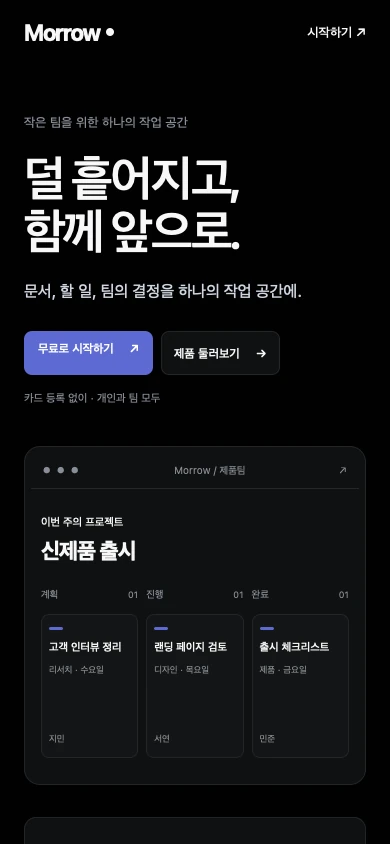
Task: Team workspace landing page / Linear and Notion DESIGN.md · Rendered at 390×844
Before · Built without the repo

After · Linear DESIGN.md
After · Notion DESIGN.md

Close-up of the same area



Three visible changes
- 01Linear: a wide black task board sits below a large, left-aligned heading.
- 02Notion: a centered heading and white task board sit inside a navy panel.
- 03Linear uses dark gray cards on the board. Notion uses white cards and pastel columns.
Code reads the color and hierarchy rules in the pinned Linear and Notion DESIGN.md files and applies each to the same Morrow team workspace landing page at 390×844.
For reference only. No brand rights are granted. · These examples reference public design documents and extracted styles. Third-party trademarks and brand rights remain with their owners.
At work · Three illustrated scenarios
One repository,
different ways to use it.
For makers who find it hard to describe a visual style: use DESIGN.md files extracted from public sites to give a coding assistant concrete color, type and layout rules.



Illustrations based on features described in the README. They depict example scenarios rather than measured results or customer deployments.
Official project screenshots
What can you
build with it?
04 / Related repositories
Which repos are connected?
Relationships and sources come from the comparison graph snapshot. Only currently public repos are shown.
scroobius-pip/fudge-design-md ↗
Shared GitHub topic: design-md,design-tokens,figma,landing-page,vibecoding
Matching repos.topics (design-md,design-tokens,figma,landing-page,vibecoding)
Graph snapshot data ↗maxbogo/awesome-ai-tools-for-ui ↗
Shared GitHub topic: figma,landing-page,vibe-design
Matching repos.topics (figma,landing-page,vibe-design)
Graph snapshot data ↗Moddingflow/better-design ↗
Shared GitHub topic: design-md,design-tokens
Matching repos.topics (design-md,design-tokens)
Graph snapshot data ↗VoltAgent/awesome-claude-design ↗
Shared GitHub topic: design-md,figma
Matching repos.topics (design-md,figma)
Graph snapshot data ↗